Balance Parental Control: Reward-based screen time management for families
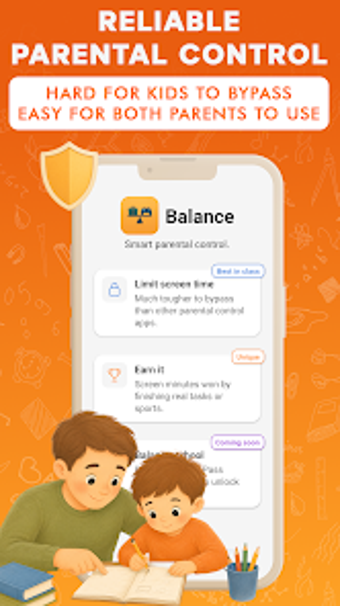
Balance Parental Control, developed by BabaYaga Program, helps parents move debates over screen time toward positive motivation and task-based rewards. The app enforces customizable daily limits for entertainment apps while letting children earn extra minutes by completing chores or homework, and it preserves essential communication apps. Its core tools include three protection levels, app categories, focus schedules, and activity reports. Parents and guardians who want collaborative, secure family management benefit from its task-reward approach.
Shifts enforcement into negotiated, responsibility-focused routines
In daily family routines Balance shifts enforcement into a negotiated deal: parents set customizable daily limits for entertainment apps while assigning chores or homework that children can complete to earn extra screen time. The app categorizes apps into Unlimited, Limited, and Blocked, so essential communication stays available even when limits are reached. That structure reframes limits as rewards, which fits parents aiming to encourage responsibility rather than impose strict bans.
Requires paired Android installations but supports shared oversight
Balance runs on Android and requires installation on both the parent's and the child's devices to function correctly, so setup includes pairing two phones. The app supports multi-parent management, allowing both parents to share full access from their respective devices. This arrangement makes daily adjustments possible from either guardian, though the need to install on multiple devices introduces an initial setup step that parents must complete before controls take effect.
Stops common bypass tactics with tiered protection
Balance includes three protection levels designed to stop common tricks children use to circumvent controls; the highest level locks down device settings to prevent unauthorized changes. This tiered model gives parents options if a child is technically adept, moving away from one-size-fits-all restrictions. The app's focus on bypass resistance is a core differentiator compared with simple timer apps that rely only on system-level limits.
Reporting and schedules make usage patterns visible for practical adjustments
For everyday monitoring the app offers focus schedules to block entertainment during homework, meals, or bedtime, and detailed activity reports with trends over days and weeks. These tools let parents see patterns of use and adjust limits or tasks accordingly, turning observation into actionable change. The task-and-reward system ties directly into these reports so parents can confirm whether assigned chores actually reduce entertainment time in measurable intervals.
To sum up, useful for cooperative parents preferring a motivational approach
To sum up, Balance is a practical choice for cooperative parents who prefer motivation-driven management of device time and shared oversight. Its recent entry into the parenting category means public review data is limited, a consideration for those wanting an extensive track record. For families ready to try a negotiated, task-first method, Balance fits daily routines that emphasize responsibility and clear parental control.